





Gold Pecker EA is an intelligent trading solution tailored for the XAUUSD (Gold) pair on MetaTrader 4. It leverages cutting-edge strategies and a combination of reliable technical tools to analyze price movements and execute trades efficiently.
Equipped with a news filter, it avoids high-impact events to help reduce trading risk and improve overall consistency. With a win ratio of up to 83%, this system offers the potential to generate passive earnings between 10% and 50%, based on the chosen risk profile.
The minimum capital required is $100, making it accessible for both beginners and experienced traders aiming to profit from gold market volatility with minimal manual effort.
Vendor Site – Link

Key Features
Key Feature #1 – Scalp or Swing Trade Gold with Precision
Tailor your strategy to match both short-term and long-term trading objectives.
Key Feature #2 – Adaptive Martingale Option
Easily modify the martingale settings or switch it off entirely. Choose your preferred level of risk!
Key Feature #3 – Precision-Based Trade Entries
Built with an advanced algorithm that delivers highly accurate trade entries, going beyond guesswork.
Key Feature #4 – Capital Protection Tools
Control your exposure and protect your trading balance with customizable risk management.
Key Feature #5 – Start with Just $100
Begin trading gold with a minimal starting fund of only $100 — ideal for small account holders.
Key Feature #6 – Minimal Drawdown
Enjoy consistent profits with a strategy designed for low drawdown and steady performance.
Trading Specifications
- Platform Compatibility: Built specifically for MetaTrader 4 for seamless integration.
- Trading Instrument: Specializes in trading Gold (XAUUSD) with precision.
- Chart Timeframe: Functions on the M5 (5-minute) timeframe for active trading.
- Trading Mode: A completely automated system, requiring no manual intervention.
- Win Ratio: Delivers a strong success rate of 83%, maximizing profitable trades.
- Earning Potential: Generate returns ranging from 10% up to 50% monthly, based on your selected risk level.
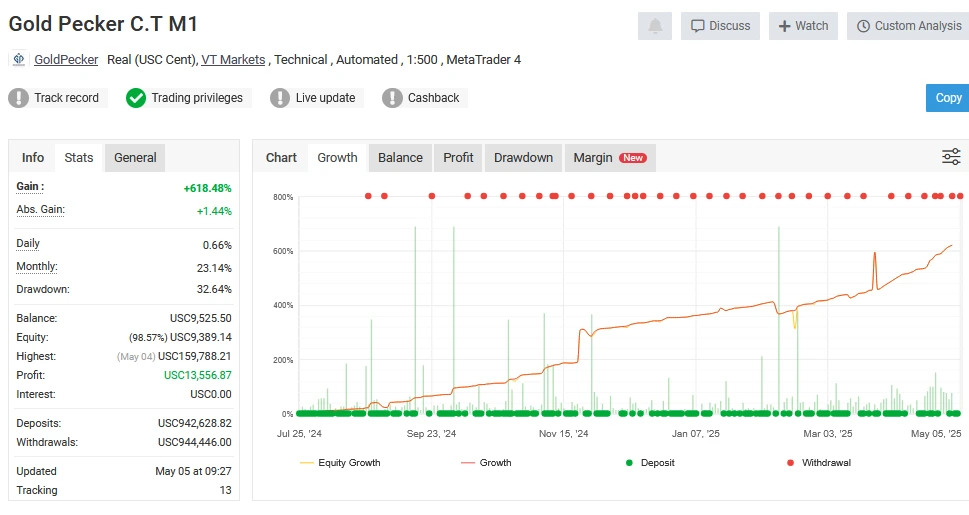
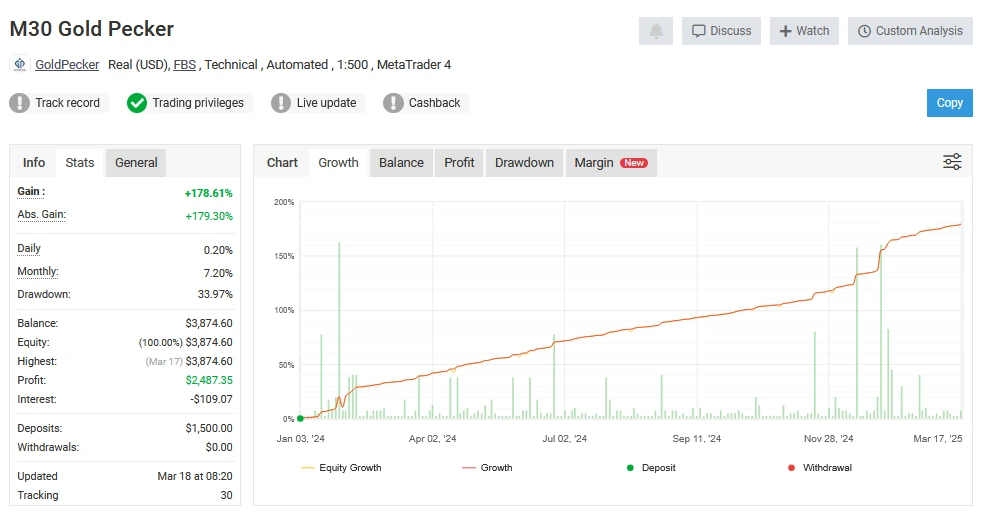
- Performance Verified: Results are authenticated through Myfxbook, adding credibility.
- Trading Techniques: Combines both scalping and swing methods for diversified strategies.
- Risk Strategy: Features an adjustable martingale option that can be turned off for safer trading.
- Entry Accuracy: Uses high-level algorithms to pinpoint precise market entries.
- Capital Safety: Equipped with comprehensive risk control features to protect funds.
- Minimum Deposit: Start with an initial investment of only $100.
- Consistent Returns: Built for steady performance with low drawdown risk.
BackTest Reports


MyFxBook Signal Reports
Gold Pecker M5 – Live Signal
GP V9 S.A. – Live Signal
Gold Pecker M5 – Live Signal
M30 Gold Pecker – live Signal
Gold Pecker C.T M1 – Live Signal


How to Install and Set Up
✅ Step 1: Install the Gold Pecker EA File in MetaTrader 4
- Launch your MetaTrader 4 platform.
- Navigate to the File menu.
- Click “Open Data Folder”.
- Open the MQL4 directory.
- Select the Experts folder.
- Paste the Gold Pecker.ex4 file into this folder.
✅ Step 2: Activate the EA on MT4
- Return to your MetaTrader 4 terminal.
- Click the “AutoTrading” button (located near the “New Order” button).
- Green indicates it’s enabled.
- Red means it’s turned off.
- Open a Gold (XAUUSD) chart.
- Press Ctrl + N or open the Navigator panel manually.
- Under Expert Advisors, right-click and select Refresh.
- Find Gold Pecker and double-click to load it onto the chart.
- Enter your license code when prompted.
✅ Step 3: Configure EA Permissions
- Go to the “Common” tab, located above the license section.
- Make sure to enable the following options:
- Allow Live Trading
- Allow DLL Imports
- Allow Import of External Experts
- Click OK to finish the setup.
This step-by-step guide is optimized for MetaTrader 4 users setting up the Gold Pecker EA on the XAUUSD chart, helping you get started quickly and securely with automated gold trading. Let me know if you’d like this formatted as a downloadable PDF or instructional blog post!
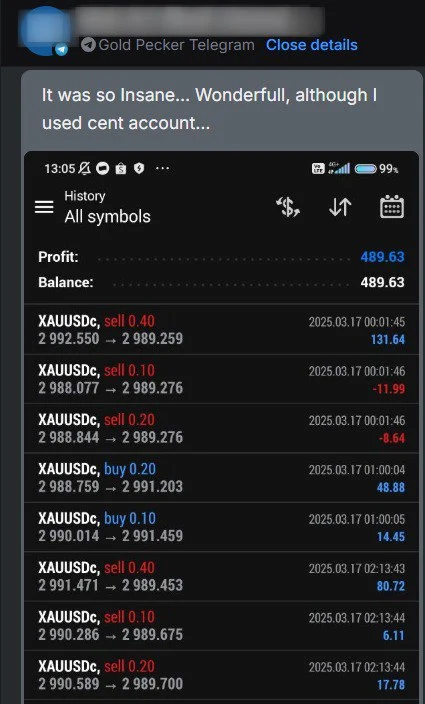
User Reviews




Trustpilot Rating
TrustPilot Rating – Link

More Profitable EAs
What Do You Receive with Your Download?
By joining ForexCrackedVIP as a Premium Member, you unlock complete access to the Gold Pecker EA bundle, which comes with:
- Expert Advisor File: Gold Pecker EA.ex4 for MetaTrader 4.
- Preconfigured Strategy Files:
- Moderate Risk – M5 timeframe (Medium Risk M5.set)
- Low Risk – M30 timeframe (Low Risk M30.set)
- Aggressive Mode – M1 timeframe (High Risk M1.set)
Why Use MQL5Cracked to Download Expert Advisors and Indicators?
✅ Access to Premium Tools – Without the High Price Tag
✅ Lifetime access after purchase
✅ Free Updates
✅ Free Support through Telegram
✅ Free Coupon codes 10% to 20%
🚀 May the markets be in your favor! 🚀




LUNA AI PRO EA MT4 BUILD 1441+ Download Now
In stock

Forex GOLD Investor EA – MyFxBook Verified XAUUSD EA with 297% Growth
In stock
Reviews
Clear filtersThere are no reviews yet.