




Dolphin EA is an advanced Expert Advisor developed for MetaTrader 4 (MT4) that leverages a hedging strategy to capture regular, modest profits. It integrates a cautious initial trade approach with sophisticated risk management tools to handle unfavorable market swings effectively. The EA emphasizes disciplined trading during selected timeframes and adjusts its settings dynamically to balance ambitious daily profit goals with a strict maximum drawdown limit, targeting steady growth over time.
Top Forex Robots for Automated Trading – View
Product Summary
- Designed exclusively for the MetaTrader 4 (MT4) platform
- Optimized for EUR/USD and GBP/USD currency pairs
- Compatible with M15, M30, and H1 timeframes
- Uses a sophisticated hedging strategy to capture frequent, small profits
- Features advanced risk management tools to protect against market reversals
- Adjustable indicator sensitivity to minimize false signals
- Includes time filters to trade only during optimal market hours
- Requires a minimum deposit of $500 and recommends leverage of 1:30
- NoDLL architecture ensures easy installation and enhanced security
- Unlimited usage license for flexible trading without restrictions
- Ideal for both novice and experienced traders aiming for consistent growth


🚀 May the markets be in your favor! 🚀
Key Features
🔹 Hedging Strategy Implementation: Employs a hedging technique by opening opposite positions when the price deviates significantly from the initial trade.
🔹 Conservative Scalping Approach: Begins trading with small lot sizes, making it suitable for cautious testing and accounts with limited capital.
🔹 Adjustable Indicator Sensitivity: Enables fine-tuning of indicator responsiveness to market fluctuations, helping to minimize false trading signals.
🔹 Volatility Assessment via ATR: Utilizes Average True Range (ATR) to gauge market volatility, which can be applied to dynamically set Stop Loss and Take Profit levels or to filter trade entries.
🔹 Time-Based Trading Filter: Incorporates a trading schedule feature to restrict activity to specific hours, avoiding times of low liquidity or excessive volatility for better trade execution.
Strategy Overview
- Employs a hedging-based approach to manage trades by opening counter positions when the market moves against the initial trade, reducing risk exposure.
- Starts with conservative lot sizes to minimize drawdowns, making it suitable for low-risk accounts and initial testing.
- Utilizes indicator sensitivity settings to filter out market noise and avoid false trading signals.
- Applies Average True Range (ATR) to dynamically adjust Stop Loss and Take Profit levels based on current market volatility.
- Trades exclusively during predefined optimal hours using a time filter to avoid periods of low liquidity and unpredictable price swings.
- Focuses on disciplined, scalable scalping to accumulate steady, incremental profits over time.
Installation Guide
- Download the Dolphin EA .ex4 file.
- Open MetaTrader 4 and go to File > Open Data Folder.
- Navigate to MQL4 > Experts and copy the EA file there.
- Restart MetaTrader 4.
- In the Navigator panel, find Dolphin EA under Expert Advisors.
- Drag and drop it onto your desired chart (EURUSD or GBPUSD, M15/M30/H1).
- Adjust settings if needed and enable AutoTrading.
You’re ready to trade!

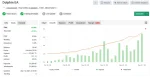
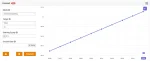
Performance Results
MyFxBook Results
What’s Included
Dolphin EA v1.0_fix.ex4
FAQs
Q1: What is Dolphin EA MT4?
A: Dolphin EA is an automated trading robot (Expert Advisor) designed for MetaTrader 4. It focuses on EURUSD and GBPUSD using a smart hedging strategy to secure consistent, small profits.
Q2: What strategy does Dolphin EA use?
A: Dolphin EA uses a hedging-based approach, opening counter trades when the market moves significantly against the initial position. It combines conservative entries, volatility filters, and risk management tools.
Q3: Which currency pairs and timeframes does Dolphin EA support?
A: It is optimized for EUR/USD and GBP/USD, and works best on the M15, M30, and H1 timeframes.
Q4: What is the minimum deposit required?
A: A minimum deposit of $500 is recommended for optimal performance and risk management.
Q5: What leverage is recommended?
A: The recommended leverage for using Dolphin EA is 1:30.
Q6: Is Dolphin EA safe for small accounts?
A: Yes, it starts with small lot sizes and is suitable for conservative trading, making it appropriate for smaller accounts and low-risk environments.
Q7: Can I control when the EA trades?
A: Yes, Dolphin EA has a built-in time filter that allows trading only during specific hours to avoid low liquidity or high volatility periods.
Q8: How does Dolphin EA manage risk?
A: It uses ATR-based volatility measurement to dynamically adjust Stop Loss and Take Profit levels. It also includes features for indicator sensitivity control and maximum drawdown protection.
Q9: Is there a limit on usage?
A: No, the product comes with an unlimited license and is NoDLL, making it easy to install and use without restrictions.
Q10: How do I install Dolphin EA on MetaTrader 4?
A:
- Download the .ex4 file.
- Open MT4 > File > Open Data Folder.
- Go to MQL4 > Experts and paste the file.
- Restart MT4 and drag the EA onto your chart.
(Refer to the visual installation guide above for help.)
Download Now –
⏱️ Instant Access | 💳 Secure Checkout | ✅ One-Time Payment
Free Download Now –
You can download it for free from our website. Please contact us if you wish to access the free download. (Conditions apply)
You may also like


Dark Gold MT4 With SetFiles – Build 1441+ for Gold, Bitcoin, EUR/USD, and GBP/USD
In stock


Trade Assistant EA MT4 – Professional Trade Management & Risk Control Tool
In stock
Reviews
Clear filtersThere are no reviews yet.