





More about InvestCox100 EA Robot
InvestCox100 EA V3.0 is a fully automated trading robot developed for the MetaTrader 4 platform. It is designed to trade multiple instruments, such as gold (XAUUSD) and major currency pairs (EURUSD, GBPUSD), from a single chart instance. It aims to simplify trading by managing both entry and exit orders as well as risk in an automatic fashion.
Key Takeaways
Multi-instrument support: You only attach the EA once (commonly on a M5 timeframe), and it monitors several markets instead of requiring a separate instance per pair.
Scalping orientation: Intended for short-term trades with quick turnarounds rather than long-term swing holds.
Automated risk controls: The software includes configurable stop-loss, take-profit, lot-sizing and trade-management settings so you can adapt risk levels to your balance or broker.
Broker suitability: Best performance typically requires low-spread ECN or raw-spread accounts. Spread, slippage and execution speed significantly affect results.
Version 3.0 updates: The third major release reportedly improves entry logic, trend-filters and news/volatility management versus earlier versions.
Recommended Setting / Features
- Compatible with XAUUSD, EURUSD, and GBPUSD
- Primary setup is on the M5 chart for XAUUSD, and from there the EA can manage trades across all supported pairs
- Uses no martingale or grid strategies, keeping risk controlled
- Built around a pure scalping methodology for quick and frequent entries
- Can run even on a small $100 account, making it accessible to beginners
Picture having a fully automated trading assistant that continuously watches XAUUSD, EURUSD, and GBPUSD for you. 📈
All you have to do is attach it to a single M5 XAUUSD chart, and from there it scans all three markets in real time, identifies optimal trade opportunities, and executes them automatically — from entry to exit — without any manual intervention.
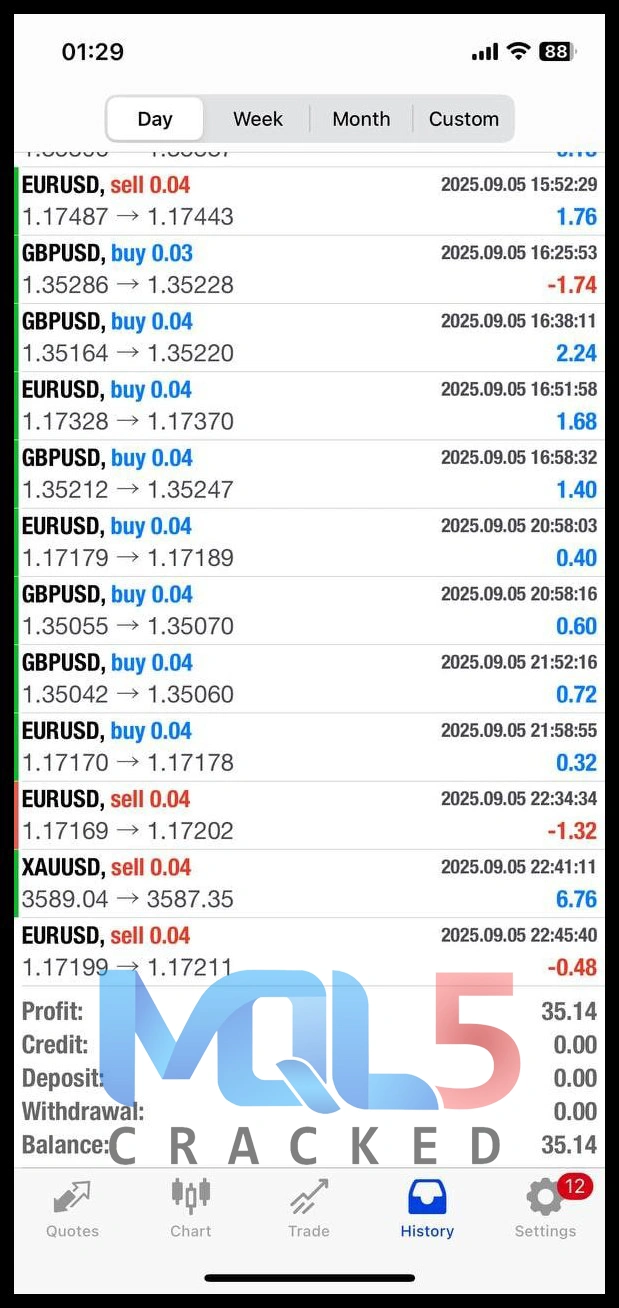
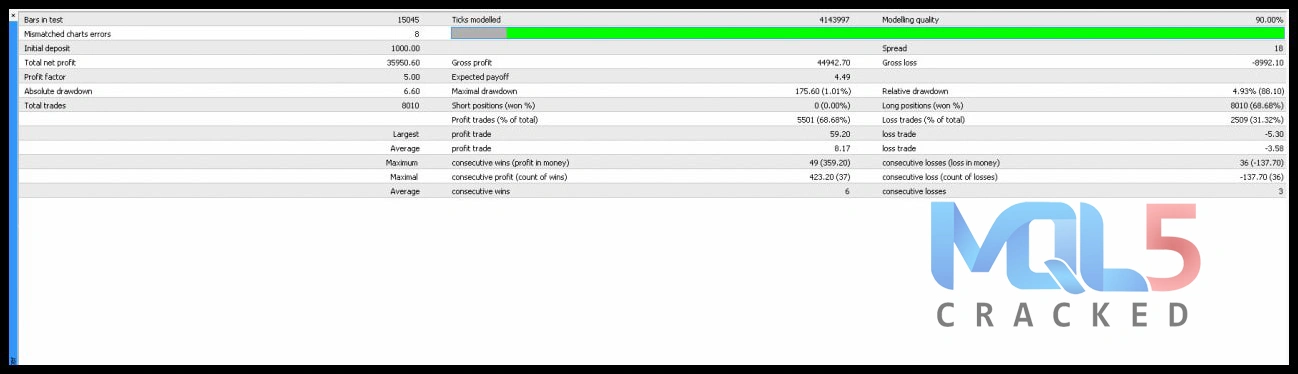
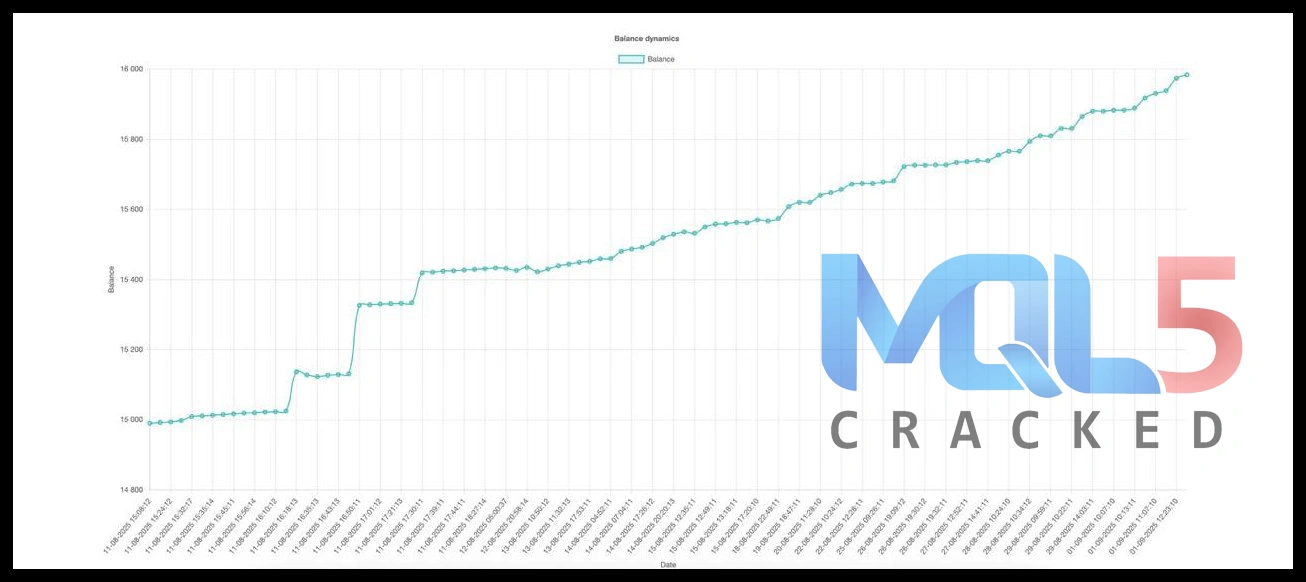
Backtest Report InvestCox100 FX
How it generally works
- Install the EA on a chart (often XAUUSD, timeframe M5).
- The EA begins scanning selected instruments (e.g., XAUUSD, EURUSD, GBPUSD) in the background.
- Once conditions defined in the algorithm are met (such as trend alignment, volatility, entry filter), it opens a trade, manages it (stop-loss, take-profit, or trailing features) and closes when exit criteria are triggered.
- The objective is consistent, low-drawdown performance rather than large, risky bets.
Performance & Real-World Considerations
- Vendors claim strong back-tests and some demo/live account data (for example a figure such as +128% in ~1 month has been cited for a demo with broker FXOpen).
- However:
- Check which account type (demo vs real) the results come from.
- Review the drawdown and number of trades: high win-rate doesn’t always equal low risk.
- Ensure your broker conditions (spread, execution, slippage) match or are better than the test conditions; performance may differ in live trading.
- Remember past performance ≠ future performance. Markets change, and what worked in one regime may underperform in another.
Recommended Setup & Tips
- Use the timeframe M5 (5-minute chart) for the main instrument, as many setups indicate.
- Test on gold (XAUUSD) and then consider major FX pairs (EURUSD, GBPUSD), depending on your license and set-files.
- Use an account type with low spread/fast execution (ECN/RAW) – scalpers are especially sensitive to transaction costs.
- Start with a demo account for at least several weeks or months to observe live execution, slippage, drawdown, and profitability in your broker environment.
- Use the preset files (if provided) as starting points. Then, if you choose to optimize, limit parameters to avoid over-fitting.
- Monitor regularly: even automated EAs need supervision (for example, when market conditions change, news events cause big spread/widening, or broker execution degrades).
Risks & What to Watch Out For
- If the EA uses “free download” versions from unknown sources, you may get outdated or altered files that perform differently (or worse).
- Some claims might be based on very short test periods or ideal conditions that don’t replicate in your real account.
- Broker differences matter: high spread, high slippage, or low liquidity can hurt scalping EAs significantly.
- Do you understand the settings? Even a “plug-and-play” robot needs correct configuration (lot sizes, pairs, account size, leverage).
- Ensure you have realistic expectations: an EA doesn’t guarantee profits; drawdowns will occur.
Who Might Benefit from It?
- Traders who prefer automated trading and don’t want to monitor every trade manually.
- Users with access to good broker conditions (low spreads, ECN environment) and time for initial testing.
- Those who already run/demo robots and understand risk management in automated trading systems.
- But: traders expecting “set-and-forget” with no review at all may still face surprises. Periodic monitoring is wise.
Final Thoughts
If you’re considering InvestCox100 EA V3.0 for MT4, the key steps are: demo-test it under your broker conditions, check live-tracking (if available), validate drawdown and trade behaviour, and proceed live only when you’re satisfied. It appears to offer multi-pair, scalping-oriented automation with modern features, but like all EAs it is not a guarantee of profit and should be treated as one tool in a broader trading setup.
Do not satisfy – Try another profitable EA’s
Why Choose InvestCox100 FX
- Fully Automated Trading
InvestCox100 FX handles trades on autopilot, so you don’t have to watch the markets all day. Its smart algorithms analyze price movements and execute trades automatically, helping you save time while staying active in the market. - High Flexibility & Customization
Tailor the EA to match your trading style. Adjust risk levels, lot sizes, and trade criteria to fit your preferences, giving you full control over your trading strategy. - Multi-Pair Trading
Trade multiple currency pairs effortlessly. InvestCox100 FX works seamlessly on XAUUSD, EURUSD, and GBPUSD, allowing you to diversify your portfolio without juggling multiple charts or platforms. - Pure Scalping Strategy
Designed for fast, efficient trades, this EA uses a scalping approach with no martingale or grid systems. It aims to capture small, consistent profits while minimizing risk. - Beginner-Friendly & Easy to Use
Even if you’re new to forex trading, setting up InvestCox100 FX is simple. Attach it to a single XAUUSD M5 chart, and it will automatically manage trades across all supported pairs. - Low Account Requirement
Start trading with as little as $100. InvestCox100 FX is designed to perform efficiently even on smaller accounts, making it accessible to beginners and budget-conscious traders. - Proven Performance Potential
With optimized strategies and real-time market analysis, this EA is built to maximize trading opportunities while keeping risk under control.
FAQ
Q1: What is InvestCox100 FX EA?
A: InvestCox100 FX EA is a fully automated trading system for the MetaTrader 4 (MT4) platform. It uses advanced algorithms to analyze market trends and execute trades on XAUUSD, EURUSD, and GBPUSD without manual intervention.
Q2: How does InvestCox100 FX work?
A: The EA runs on a single M5 XAUUSD chart and automatically monitors multiple pairs. It identifies optimal entry and exit points, executes trades, and manages risk, all based on a pure scalping strategy with no martingale or grid techniques.
Q3: Which currency pairs can I trade with InvestCox100 FX?
A: InvestCox100 FX primarily supports XAUUSD, EURUSD, and GBPUSD. Once attached to the XAUUSD M5 chart, it can manage trades across all supported pairs simultaneously.
Q4: What is the minimum account requirement?
A: InvestCox100 FX is designed to work efficiently even on smaller accounts, with a minimum recommended balance of $100.
Q5: Do I need prior trading experience to use InvestCox100 FX?
A: No. InvestCox100 FX is beginner-friendly. Its intuitive setup allows anyone to start automated trading by simply attaching the EA to the chart.
Q6: Does InvestCox100 FX use risky strategies like martingale or grid?
A: No. The EA uses a pure scalping strategy and avoids risky methods such as martingale and grid, ensuring safer, controlled trading.
Q7: Can I customize InvestCox100 FX settings?
A: Yes. Traders can adjust risk management, lot sizes, and trade parameters to fit their individual trading style and risk tolerance.
Q8: Can I backtest InvestCox100 FX before going live?
A: Absolutely. The EA supports historical backtesting in MT4, allowing traders to optimize settings and understand potential performance under different market conditions.
Q9: Is InvestCox100 FX suitable for all traders?
A: Yes. Whether you are a beginner looking for hands-off trading or an experienced trader seeking efficiency, InvestCox100 FX is suitable for all skill levels.
Q10: Where can I download InvestCox100 FX EA?
A: You can download InvestCox100 FX EA from the official provider’s website or authorized MT4 EA platforms to ensure safety and genuine software.
Download InvestCox100 for free
At MQL5Cracked, we offer exclusive access to premium trading tools — completely free for our members! Choose one of the following options to get started:
Join our VIP program and unlock unlimited access to all Expert Advisors, trading robots, and indicators



Best XAU/USD Forex Expert Advisors – Combo Pack
In stock

QUANTUM QUEEN EA V3.7 MT5 Review / +3,168.20 Myfxbook Gain & 3523% Signal Growth
In stock

Forex GOLD Investor EA – MyFxBook Verified XAUUSD EA with 297% Growth
In stock
Reviews
Clear filtersThere are no reviews yet.